Got feedback? Additional questions? Just want to have a friendly chat?
Get in touch!
What is precomputed origin destination analysis?
Computing an origin destination matrix on-the-fly can be expensive, especially for many moving vehicles or people.
In such cases, it is often preferable to precompute origin destination values upfront and store the results in a dedicated table. This table can then be accessed directly by the platform, avoiding repeated origin destination computations at query time and improving performance and scalability.
Typical use cases include:
-
Nation-wide or city-wide origin destination matrices computed per hour, day, or week
-
origin destination matrices derived from historical floating-vehicle or telco data
-
Reporting or dashboard scenarios where the same origin destination aggregates are reused frequently
Precomputed origin destination analysis allows you to analyze flows between fixed origins and destinations where the values are already aggregated by origin-destination pair. Time series of values over time (e.g., every 15 minutes) are supported.
Each record then represents a flow between an origin and a destination for a given time slice, for example:
-
number of people
-
number of trips
-
average travel time
This approach enables fast and scalable analysis of large origin destination matrices without reconstructing individual trajectories at query time.
From data to insights
The different steps required to go from your data to insights are:
-
Create a database time series data set using:
-
a geometry table defining the areas
-
a time series table containing the precomputed origin destination data
-
Make sure to configure the origin and destination columns correctly.
-
-
Use the origin destination capability of the visual analytics page.
The sections below (and the next articles) walk through each step in detail.
-
Prepare the database data set
Precomputed origin destination analysis is supported for database time series data sets. These require a geometry table and a time series table. The time series table must contain at least these two columns: one for the origin and one for the destination.
In this step you configure the data set so that the platform understands which columns correspond to origins and destinations.
-
Analyze
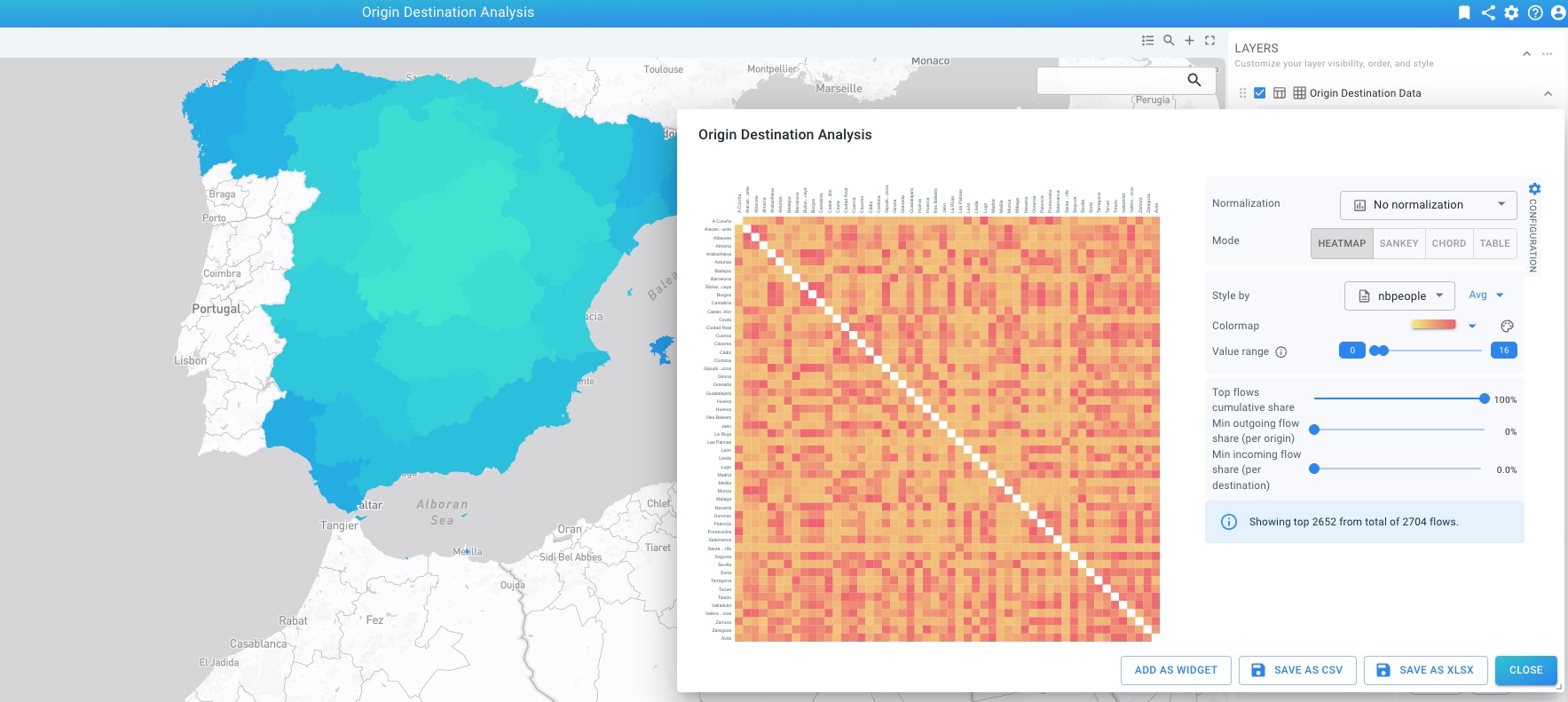
Open the Origin Destination dialog, configure the visualization mode, choose an attribute to style by, and inspect or export the results.
| The platform supports two types of origin destination analysis. Dynamic origin destination analysis is supported for movement and movement path data. In this case the origin destination data is computed on-the-fly from user-defined areas and moving assets. Precomputed origin destination analysis is supported for (database) time series data where the origins and destinations are fixed and values are precomputed for different time slices (for example every 15 minutes of every day). |
Got feedback? Additional questions? Just want to have a friendly chat?
Get in touch!