Got feedback? Additional questions? Just want to have a friendly chat?
Get in touch!
Road-network requirements
Intersection analysis needs a connected line network, typically a road network. The platform uses its graph to identify junctions, the roads connected to each junction and their incoming and outgoing directions.
At a minimum, the geometry must provide:
-
Line geometries representing road segments.
-
A unique identifier for each road segment.
-
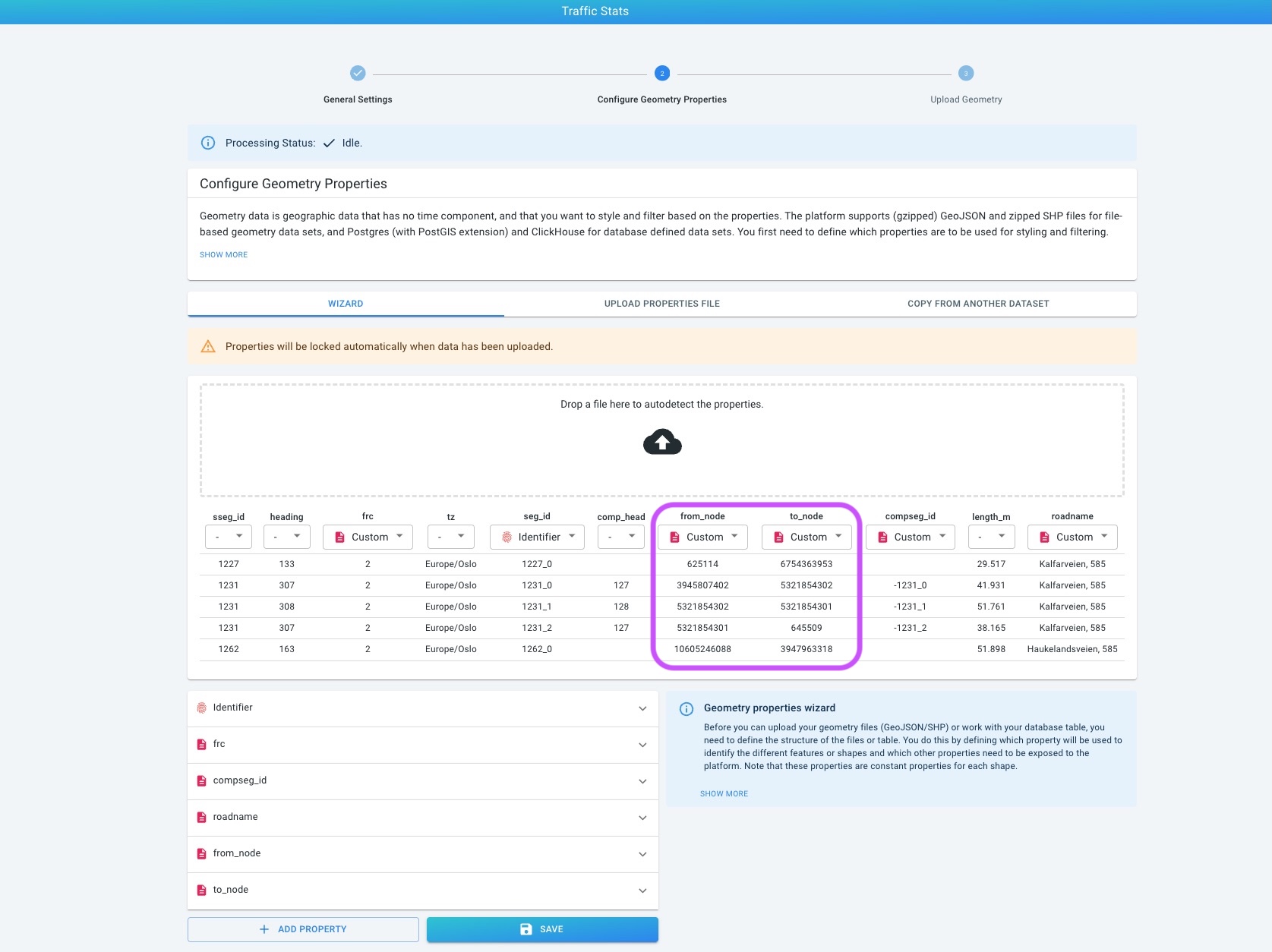
Start node and end node identifiers that describe the connectivity of the road network.
The node identifiers must be configured as special content types in the data set schema:
-
Source property such as
from_node→ Edge start node ID -
Source property such as
to_node→ Edge end node ID
The property names can differ; what matters is that they are assigned the correct content types and consistently identify the same graph nodes across connected road segments.
| Having road lines on the map is not enough. Without the configured edge start/end node identifiers, the platform cannot build the road-network graph required for intersection analysis. |
Supported data set types
| Data set | Approaches | Turns |
|---|---|---|
Geometry |
Yes |
No. Geometry provides network geometry and static attributes, not trip sequences. |
Time Series |
Yes |
No. It provides time-varying attributes on road segments, but not complete trip paths. |
Movement Path |
Yes |
Yes, when it contains trips traversing the configured graph-enabled road network. |
For a Movement Path data set, first prepare a road-network Geometry data set and then create the Movement Path data set against that geometry. Each trip is described by a sequence of referenced road segments. This allows the platform to determine which incoming road a trip used and which outgoing road it took.
For details about the road-network and movement-path formats, see the route analysis data set configuration and the Movement Path data documentation.
Configuring the network
-
Create a Geometry or Time Series data set containing your line-based road network. For Movement Path data, create the underlying road-network Geometry data set first.
-
In the data set’s property configuration, assign Edge start node ID and Edge end node ID to the correct node properties.
-
Upload and finalize the network. Make sure the resulting topology connects segments at the intended intersections and roundabouts.
-
If you need turn analysis, create the associated Movement Path data set and upload trip sequences referencing the same road segment identifiers.
-
Add the resulting data set to your project and open the Visual Analytics page.
| Data set properties are locked after upload or finalization. If node properties were not configured before the data was uploaded, you may need to create a correctly configured data set and upload the data again. |
Direction, values and time
The network’s direction matters: the start and end nodes determine the directed edges from which incoming and outgoing roads are identified. If your source represents both travel directions using separate or reverse identifiers, configure that representation consistently with your network data. A Reverse ID property can be used where applicable to describe the reverse direction.
The diagram reflects the selected layer and its current analysis context:
-
In Geometry data sets, the available values come from the static network properties or counts represented by the layer.
-
In Time Series data sets, attributes can change with the selected time interval.
-
In Movement Path data sets, the analysis uses the trips represented along the road network. Turns are calculated from actual segment sequences, not inferred from individual road segment volumes.
-
Layer filters and the current time selection determine which records or trips contribute to the result.
| When diagnosing missing or unexpected approaches, first inspect the node connectivity and travel direction of the segments around the junction. For missing turning movements, also check that the Movement Path trips reference the expected road segments. |
Got feedback? Additional questions? Just want to have a friendly chat?
Get in touch!